Kotlin on Apache Hive – UDTFs

How to make one into many

In this series, we’ve now arrived here:

  1. Intro
  2. Unit Tests
  3. Complex UDF
  4. Complex UDF 2
  5. UDTFs

Now that we know all about how to add new methods to Hive, lets move out of the scalar world and start thinking in rows!

What does that mean?

Recall that I’m using the term “scalar” to refer to the fact that the data comes in from a single row. So an integer column would be a scalar value here but so too would an array or map even though they technically contain many values inside of the structure. I use this term to emphasize that all the data is together all at once in the worker and not distributed across the cluster. The UDFs in our previous cases can be quite straightforward because they make this assumption across the board. They don’t have to deal with any sort of consolidation of data from sibling workers. It has all the data it needs now and can therefore give a complete answer now.

Given that, lets define UDTF (or User Defined Table Function) as a UDF that takes a scalar value in and gives out a vectorized output. You can think of its purpose as creating a table out of a single, scalar value. This can be enormously useful in the right situations. The most obvious is the built-in Hive UDF ‘explode’ which takes in an array or map of values and turns it into multiple rows alongside all the other columns of that row in the table. This is a great way to literally explode (the name is appropriate!) the value out into the cluster to be aggregated in a distributed fashion any way that you wish. It goes from the single worker mode to a highly distributed effort without requiring a lot of work on your part. Handy! Go see that there are other builtin UDTFS too.

What does that look like?

We can use a UDTF in one of two ways. First, directly in the SELECT clause as the only declared column like this:

SELECT explode(ARRAY(1,2,3)) AS item

Or in a LATERAL VIEW clause like this:

SELECT
  users.user_info,
  view1.item
FROM users
LATERAL VIEW explode(ARRAY(1,2,3)) view1 AS item

Obviously the first case is nice for extremely simple circumstances like testing, but in almost any practical application you’ll want to make use of the lateral view. Especially be aware that we can add the keyword OUTER before the UDTF call to make this more like an outer join in the sense that a row will still be emitted even if the UDTF returns a NULL or empty collection for the input row.

Explosive ideas

We’ll set out to imitate a pretty classic structure in most modern programming languages as our UDTF inspiration. For example, in Kotlin (since that’s our foundational motivation here!) we have a way to do something like:

for(i in 1..5) {
  // ...do something with counted index...
}

Logically, this takes the input parameters 1 and 5. It would then produce the sequence: 1, 2, 3, 4, 5, stop! Each of these iterations would give the option to do some additional work with that counted index. You could additionally specify a step size like so:

for(i in 1..5 step 2) {
  // ...do something with counted odd index...
}

Where now we have the three parameters of 1, 5, and 2. It would produce the sequence: 1, 3, 5.

So, mapping to our Hive UDTF scenario, we will expect to take 1 to 3 parameters and then emit a new row with the index for every item in the sequence as described above. We will allow the one parameter case for implying that you’ll start at one for simple cases. For example, SELECT explode_times(5) would mean the same thing as SELECT explode_times(1,5) and be supported to allow a bit of brevity if the user wishes it.

Calling this with an example response might look like the following:

SELECT explode_times(1,5,2);
==>
  1
  3
  5

Or alternatively:

CREATE TABLE some_junk AS
SELECT junk
FROM ( SELECT 'junk' AS junk ) one_junk;

SELECT iter.index, junk
FROM some_junk
LATERAL VIEW explode_times(1,5,2) iter AS index;
==>
  1, 'junk'
  3, 'junk'
  5, 'junk'

Make sense? This is actually a super useful method to have around. You can use it to procedurally generate any countable list of things from nothing (i.e., no persisted storage) whenever you wish. It’s like pulling a table from magic. This can be great for testing, but also imagine needing something like a list of the dates of every Tuesday over a range of time from some start date. You could easily generate this by saying something like:

SELECT
  tuesdays.tuesday AS first_tuesday,
  iter.num_tuesdays,
  DATE_ADD(tuesdays.tuesday, iter.num_tuesdays*7) AS num_tuesdays_date
FROM (
  SELECT '2016-03-22' AS tuesday
) tuesdays
LATERAL VIEW explode_times(1,3) iter AS num_tuesdays;
==>
  '2016-03-22', 1, '2016-03-29'
  '2016-03-22', 2, '2016-04-05'
  '2016-03-22', 3, '2016-04-12'

See how we generated that last column from a combination of our countable iterator and the the start date of the column from the original row? Think of all the possibilities!

Full on generic

Recall from the last post that for anything more than a simple scalar UDF in Hive requires that you use their “Generic” base classes which no longer use reflection to make things easy. As such, lets start building a helper class just like we did for tests so that we can keep our main code as clear and readable as possible. Here’s what we’ll start with:

import org.apache.hadoop.hive.ql.exec.UDFArgumentException
import org.apache.hadoop.hive.serde2.objectinspector.ObjectInspector
import org.apache.hadoop.hive.serde2.objectinspector.primitive.WritableConstantIntObjectInspector
import org.apache.hadoop.hive.serde2.objectinspector.primitive.WritableIntObjectInspector

object UDFUtil {

    fun expectPrimitive(oi:ObjectInspector, context:String) {
        if(oi.category != ObjectInspector.Category.PRIMITIVE) {
            throw UDFArgumentException("$context should have been primitive, was ${oi.category}")
        }
    }

    fun expectInt(oi:ObjectInspector, context:String) {
        expectPrimitive(oi, context)
        if(oi !is WritableIntObjectInspector) {
            throw UDFArgumentException("$context should have been an int, was ${oi.javaClass}")
        }
    }

    fun expectConstantInt(oi:ObjectInspector, context:String) {
        expectPrimitive(oi, context)
        if(oi !is WritableConstantIntObjectInspector) {
            throw UDFArgumentException("$context should have been a constant int, was ${oi.javaClass}")
        }
    }

    fun requireParams(context:String, args:Array<Any?>, sizeRange:IntRange, allowNull:Boolean=false):Array<Any> {
        if(!sizeRange.contains(args.size)) {
            if(sizeRange.first == sizeRange.last) {
                throw UDFArgumentException("$context takes ${sizeRange.first} params!")
            }
            else {
                throw UDFArgumentException("$context takes ${sizeRange.first} to ${sizeRange.last} params!")
            }
        }

        if(!allowNull) {
            val nullParamIndexes = args.mapIndexed { index, it -> if (it == null) index else null }.filterNotNull()
            if(nullParamIndexes.size > 0) {
                throw UDFArgumentException("$context requires no null params! (found nulls for params: ${nullParamIndexes.joinToString(", ")})")
            }
        }

        return args.requireNoNulls()
    }

}

For now, all this provides are some easy ways to express input requirements for the generic UDF. For instance, we can state things like “we expect this param to be an integer”. As you’ll see in the next section, this simplifies our code a lot! Note that I’m going to hold off being exhaustive for all types and situations here until we actually have a need down the line.

Emit, emit, emit

So lets see what the implementation looks like in code:

import org.apache.hadoop.hive.ql.exec.Description
import org.apache.hadoop.hive.ql.exec.UDFArgumentException
import org.apache.hadoop.hive.ql.udf.generic.GenericUDTF
import org.apache.hadoop.hive.serde2.objectinspector.ObjectInspectorFactory
import org.apache.hadoop.hive.serde2.objectinspector.StructObjectInspector
import org.apache.hadoop.hive.serde2.objectinspector.primitive.PrimitiveObjectInspectorFactory

@Description(
    name = "explode_times",
    value = "_FUNC_(low, high, incr) - Emits all ints from the low bound to the high bound adding the incr each time",
    extended = """
For example, you could do something like this:

  SELECT explode_times(3)
    ==>
        1
        2
        3

  or

  SELECT explode_times(3, 5)
    ==>
        3
        4
        5

  or

  SELECT explode_times(1, 3, 2)
    ==>
        1
        3
        5
"""
)
class ExplodeTimesUDTF : GenericUDTF() {

    override fun initialize(argOIs:StructObjectInspector?):StructObjectInspector {
        if(argOIs == null) {
            throw UDFArgumentException("Something went wrong, this should not be null")
        }

        val inputFields = argOIs.allStructFieldRefs
        if(inputFields.size < 1 || inputFields.size > 3) {
            throw UDFArgumentException("ExplodeTimesUDTF takes 1 to 3 params!")
        }

        UDFUtil.expectInt(inputFields[0].fieldObjectInspector, "ExplodeTimesUDTF param 1")
        if(inputFields.size > 1) {
            UDFUtil.expectInt(inputFields[1].fieldObjectInspector, "ExplodeTimesUDTF param 2")
        }
        if(inputFields.size > 2) {
            UDFUtil.expectInt(inputFields[2].fieldObjectInspector, "ExplodeTimesUDTF param 3")
        }

        return ObjectInspectorFactory.getStandardStructObjectInspector(
            listOf("iter"),
            listOf(PrimitiveObjectInspectorFactory.javaIntObjectInspector)
        )
    }

    override fun process(args:Array<Any?>?) {
        if(args == null) return
        val safeArgs = UDFUtil.requireParams("ExplodeTimesUDTF", args, 1..3)

        // Start at 1 if we only specify a high bound, or take the first param otherwise
        val lowBound = if(safeArgs.size > 1) {
            PrimitiveObjectInspectorFactory.writableIntObjectInspector.get(safeArgs[0])
        }
        else {
            1
        }

        // End at the first param if it's the only one, or the second if we have more
        val highBound = if(safeArgs.size > 1) {
            PrimitiveObjectInspectorFactory.writableIntObjectInspector.get(safeArgs[1])
        }
        else {
            PrimitiveObjectInspectorFactory.writableIntObjectInspector.get(safeArgs[0])
        }

        // Increment by 1 by default, else use the third param if present
        val increment = if(safeArgs.size > 2) {
            PrimitiveObjectInspectorFactory.writableIntObjectInspector.get(safeArgs[2])
        }
        else {
            1
        }

        for(index in lowBound..highBound step increment) {
            forward(arrayOf(index))
        }
    }

    override fun close() {}

}

Pretty straightforward, no? You should be able to recognize the structure of the initialize method from the generic sandbox UDF we implemented last time. The initialize method will get run first on the master node to validate what’s getting passed in to the UDF. This way it can fail very fast if the number of parameters or their types are wrong. The initialize method will then get called again once (and only once!) on each worker executing the method. Keep this in mind if you do anything resource intensive here like pulling additional data across the network.

Now pay attention to process. This will get executed once for each input row. Its arguments are the scalar values from the row getting passed into your UDF. At the end, you can see a call to forward() which is the place making zero or more emits for that input row which is what sends this data off into row-oriented land rather than just being a one-to-one mapping.

For everything in between, I’m just mapping those input parameters to the Kotlin range clause in a for loop. See here if you’d like more details about how that works.

Finally, the GenericUDTF base class requires that we define a close() method, but we have no need for it to do anything since we’re not retaining any state or other system resources.

A testing new problem

We’ve actually got a somewhat new scenario to test here. Before, we have always followed the formula:

assertEquals(
  expectedStringEncodedResponse, 
  queryOne("SELECT our_method(constant_input)")
)

However, now we’ll have to follow a pattern more like this:

assertEquals(
    listOf(expectedStringEncodedResponse), 
    query("SELECT our_method(constant_input)")
)

This is because the singular row’s scalar input will now be getting converted to a multi-row table-esque output. Hence the fact that our expectations will now be lists. In our test world, expecting listOf() means Hive table (i.e., calling the helper method query()) and expecting a single object or string means scalar (i.e., calling the helper method queryOne()). Luckily this isn’t much of a change and should be easy to work in to our current design!

Given this, lets dive into the actual tests:

import com.klarna.hiverunner.HiveShell
import com.klarna.hiverunner.annotations.HiveSQL
import org.junit.Assert.*
import org.junit.Test

class ExplodeTimesUDTFTest : TestBase("explode_times", ExplodeTimesUDTF::class) {

    @Suppress("unused")
    @field:HiveSQL(files = arrayOf())
    var hiveShell:HiveShell? = null

    @Test
    fun simple() {
        assertEquals(
            listOf("1", "2", "3", "4", "5"),
            query("SELECT explode_times(5)")
        )
    }

    @Test
    fun simpleRange() {
        assertEquals(
            listOf("3", "4", "5"),
            query("SELECT explode_times(3, 5)")
        )
    }

    @Test
    fun rangeWithIncrementAmount() {
        assertEquals(
            listOf("1", "3", "5"),
            query("SELECT explode_times(1, 5, 2)")
        )
    }

    /**
     * Nulls are not allowed!
     */
    @Test(expected = IllegalArgumentException::class)
    fun nullSingle() {
        query("SELECT explode_times(NULL)")
    }

    @Test
    fun nonConstantInputIsAllowed() {
        assertEquals(
            listOf(
                "A\t1",
                "B\t1",
                "B\t2",
                "C\t1",
                "C\t2",
                "C\t3"
            ),
            query("""
                SELECT
                    group,
                    iter
                FROM (
                    SELECT INLINE(ARRAY(
                        STRUCT('A', 1),
                        STRUCT('B', 2),
                        STRUCT('C', 3)
                    )) AS (group, dynamic_high)
                ) data
                LATERAL VIEW explode_times(1, dynamic_high) v1 AS iter
            """)
        )
    }

}

The first three test cases follow our examples above and are very straightforward. The only thing really worth noting is that the apparent consistent order of elements here is actually an illusion. Because we’ve broken out into multi-row land, these could all get split across multiple workers. This means that when they finally get re-aggregated to a table’s object files or as input to another step they may be in only partial sorted order or not at all. If you require an order, always state this in your query using a SORT BY or ORDER BY clause so that Hive can make this guarantee. There’s a whole world of discussion about which to choose depending on your needs, so make that choice very carefully (e.g., ORDER BY is very, very painful in terms of efficiency for Hive in almost all but the simplest cases).

The last method illustrates an interesting point. My first crack at writing this for you used my UDFUtil.requireConstantInt() contract enforcement in order to follow my examples. Then I realized that that was restricting things for no good reason! If we just require any int from anywhere instead, then we open the door to taking dynamic input from other sources. This test acts as a great example of verifying that that works, and also future proofs against anyone who makes later changes accidentally reverting back to a constant-only or similar value restriction.

The last example also dives into our new multi-row expectation scenario more. We can see for the first time what’s happening when testing against the shell. For quick behind the scene details, the Klarna HiveRunner uses the CLIDriver class as the entry point (this is the same used when calling hive on the command-line) for all these queries. It can also use the BeeLine class instead if you wanted so simulate using a Beeline client. If you wish to do the latter, then you must re-build the HiveRunner jar with the -DcommandShellEmulation=BEELINE option set for Maven. See their github page here for more details. This is obviously a pain, but if it’s a real need for you it can be worth it!

Given all that, this explains why we’re seeing rows of tab-separated value columns. This is literally exactly the same thing you’d be getting if you did this:

kotlin-hive-udtfs$ mvn clean package
...

kotlin-hive-udtfs$ cd target/

target$ hive
...

hive> ADD JAR jars/kotlin-runtime-1.0.1.jar;
Added [jars/kotlin-runtime-1.0.1.jar] to class path
Added resources: [jars/kotlin-runtime-1.0.1.jar]

hive> ADD JAR jars/kotlin-stdlib-1.0.1.jar;
Added [jars/kotlin-stdlib-1.0.1.jar] to class path
Added resources: [jars/kotlin-stdlib-1.0.1.jar]

hive> ADD JAR kotlinhive-udtfs-1.0.0.jar;
Added [kotlinhive-udtfs-1.0.0.jar] to class path
Added resources: [kotlinhive-udtfs-1.0.0.jar]

hive> CREATE TEMPORARY FUNCTION explode_times AS 'com.mergehead.kotlinhive.udtfs.ExplodeTimesUDTF';
OK
Time taken: 0.39 seconds

hive> SELECT
    >     group,
    >     iter
    > FROM (
    >     SELECT INLINE(ARRAY(
    >         STRUCT('A', 1),
    >         STRUCT('B', 2),
    >         STRUCT('C', 3)
    >     )) AS (group, dynamic_high)
    > ) data
    > LATERAL VIEW explode_times(1, dynamic_high) v1 AS iter;
Query ID = user_20160331075858_ae82d389-2e50-4e32-a712-2a6144a66bf9
Total jobs = 1
Launching Job 1 out of 1
Number of reduce tasks is set to 0 since there's no reduce operator
Job running in-process (local Hadoop)
Hadoop job information for Stage-1: number of mappers: 0; number of reducers: 0
2016-03-31 07:58:23,169 Stage-1 map = 100%,  reduce = 0%
Ended Job = job_local106521103_0001
MapReduce Jobs Launched: 
Stage-Stage-1:  HDFS Read: 0 HDFS Write: 0 SUCCESS
Total MapReduce CPU Time Spent: 0 msec
OK
A	1
B	1
B	2
C	1
C	2
C	3
Time taken: 2.915 seconds, Fetched: 6 row(s)

See? Same output! Each row there is an entry in the list, and each entry contains a string of the string encoded column values separated by the default column separation value (i.e., tab). And doesn’t this process look exactly like that first verification we did in the intro post? Coincidence?!

Onwards!

You can find all the code used in this post here. And with that, you now have another new tool in your Hive belt. You can use these for all manner of things beyond these simple examples. For instance, imagine having an ETL created denormalized scalar user object containing lots of random, poorly formatted info. You could use something like this to crawl all over that model and emit the interesting attributes you discover. Then back on the Hive level you can aggregate these attributes however you wish to look for interesting, emergent patterns out of that population. For example, something like this:

SELECT 
  cool_observation,
  COUNT(*) AS num_users,
  SUM(how_much) AS how_much_they_did_it
FROM users 
LATERAL VIEW make_cool_observations(denormed_data) v1 AS cool_observation, how_much
GROUP BY cool_observation

Hive will scale the execution of both the explosion of the observations and the aggregated counts very efficiently across all the available hardware. Very handy!

That’s just some food for thought to tide you over until next time. Then we’ll be working with UDAFs. The excitement!
Kotlin on Apache Hive – UDTFs

Kotlin on Apache Hive – Complex UDF 2

How to work with many

In this series, we’ve now arrived here:

  1. Intro
  2. Unit Tests
  3. Complex UDF
  4. Complex UDF 2

We’ve just built the most useful method that I have ever seen. How could we top that? We’re going to give it multiple levels of responsibility at the same time, that’s how! Lets add type overloading, handle lists & maps, and then take a peak at what awaits us even further into the Hive UDF innards.

Giving it all you’ve got

If each UDF could only handle only one type of input and output, that would make many things super annoying. You’d need a int_sandbox, string_sandbox, array_sandbox, etc method for every possible type you’d ever want to handle. Plus you’d have to communicate all this to the user lest they think that they can’t do what they want! What a pain.

Lets instead allow for a single UDF to handle more than one input type. Here what this would look like:

import org.apache.hadoop.hive.ql.exec.Description
import org.apache.hadoop.hive.ql.exec.UDF

@Description(
    name = "sandbox_overloaded",
    value = "_FUNC_(x) - Takes a string or struct, returns downcased string or part of struct",
    extended = """
For example, you could do something like this:

  SELECT _FUNC_('Test Me');
    ==> test me

or this:

  SELECT _FUNC_(NAMED_STRUCT('value', 'Test Me', 'otherValue', 123));
    ==> {'value': 'test me', 'othervalue': 123}
"""
)
class SandboxOverloadedUDF : UDF() {

    class TestMe {
        var value:String? = null
        var otherValue:Int? = null

        fun undefined():Boolean {
            return value == null || otherValue == null
        }

        fun reset() {
            value = null
            otherValue = null
        }
    }

    val testMe = TestMe()

    fun evaluate(arg:TestMe?):TestMe {
        if(arg == null || arg.undefined()) {
            testMe.reset()
            return testMe
        }

        testMe.value = arg.value?.toLowerCase()
        testMe.otherValue = arg.otherValue

        return testMe
    }

    fun evaluate(input:String?):String? {
        return input?.toLowerCase()
    }

}

This looks very similar to SandboxComplexUDF, but this one adds back in the simple string evaluate from our original case. It’s important that both methods have the exact same name, but the input parameters and return type can be whatever you wish. The UDF will then behave pretty much as expected when called from a shell. For example, see this experiment:

hive> ADD JAR jars/kotlin-runtime-1.0.1.jar;
Added [jars/kotlin-runtime-1.0.1.jar] to class path
Added resources: [jars/kotlin-runtime-1.0.1.jar]

hive> ADD JAR jars/kotlin-stdlib-1.0.1.jar;
Added [jars/kotlin-stdlib-1.0.1.jar] to class path
Added resources: [jars/kotlin-stdlib-1.0.1.jar]

hive> ADD JAR kotlinhive-complexudf-1.0.0.jar;
Added [kotlinhive-complexudf-1.0.0.jar] to class path
Added resources: [kotlinhive-complexudf-1.0.0.jar]

hive> CREATE TEMPORARY FUNCTION sandbox_overloaded AS 'com.mergehead.kotlinhive.complexudf.SandboxOverloadedUDF';
OK
Time taken: 0.354 seconds

hive> SELECT sandbox_overloaded('Test Me');
OK
test me
Time taken: 0.32 seconds, Fetched: 1 row(s)

hive> SELECT sandbox_overloaded(NAMED_STRUCT(
    >   'value', 'Test Me', 
    >   'otherValue', 123
    > ));
OK
{"value":"test me","othervalue":123}
Time taken: 0.046 seconds, Fetched: 1 row(s)

This can be useful if a user wants to perform some action, but doesn’t have a lot of awareness of underlying structure. For instance, you could use overloading to support different versions of a stream of data that has changed over time (e.g., from bug fixes, new features, etc). The user calling the method just knows they want to take an action on that stream and doesn’t care about what’s underneath. This way they don’t have to think since you just automatically map from their input type to the appropriate implementation. Useful!

See unit tests for this UDF here for more exhaustive use cases.

If it fits, it collects

What about when we want to work with more than one thing contained in a single row? With Hive, this can happen in three cases:

  1. Input is an ARRAY type
  2. Input is a MAP type
  3. Input has a variable number of arguments
    (e.g., GREATEST(1, 2, 3, ..., 50) => 50)

We’ll use this quick UDF to demo how to support these in Hive:

import org.apache.hadoop.hive.ql.exec.Description
import org.apache.hadoop.hive.ql.exec.UDF

@Description(
    name = "sandbox_collections",
    value = "_FUNC_(x) - takes in a collection of TestMes and works on all of them",
    extended = """
For example, you could do something like this:

  SELECT _FUNC_(NAMED_STRUCT('value', 'Test Me', 'otherValue', 123));
    ==> {'value': 'test me', 'othervalue': 123}

or this:

  SELECT _FUNC_(ARRAY(NAMED_STRUCT('value', 'Test Me', 'otherValue', 123)));
    ==> [{'value': 'test me', 'othervalue': 123}]

or this:

  SELECT _FUNC_(MAP('banana', NAMED_STRUCT('value', 'Test Me', 'otherValue', 123)));
    ==> {'banana': {'value': 'test me', 'othervalue': 123}]}

or this:

  SELECT _FUNC_(
    NAMED_STRUCT('value', 'Test Me', 'otherValue', 123),
    NAMED_STRUCT('value', 'Test Me Too', 'otherValue', 456)
  );
    ==> [{'value': 'test me', 'othervalue': 123}, {'value': 'test me too!', 'othervalue': 456}]
"""
)
class SandboxCollectionsUDF : UDF() {

    class TestMe {
        var value:String? = null
        var otherValue:Int? = null

        fun undefined():Boolean {
            return value == null || otherValue == null
        }

        fun reset() {
            value = null
            otherValue = null
        }

        fun clone():TestMe {
            val retVal = TestMe()
            retVal.value = value
            retVal.otherValue = otherValue
            return retVal
        }

    }

    val testMe = TestMe()

    private fun mapStructValue(arg:TestMe?):TestMe {
        if(arg == null || arg.undefined()) {
            testMe.reset()
            return testMe
        }

        testMe.value = arg.value?.toLowerCase()
        testMe.otherValue = arg.otherValue

        return testMe
    }

    fun evaluate(argList:List<TestMe?>?):List<TestMe>? {
        if(argList == null) {
            return null
        }

        return argList.map { mapStructValue(it).clone() }
    }

    fun evaluate(argMap:Map<String?, TestMe?>?):Map<String?, TestMe>? {
        if(argMap == null) {
            return null
        }

        return argMap.map { Pair(it.key, mapStructValue(it.value).clone()) }.toMap()
    }

    fun evaluate(vararg varArg:TestMe?):List<TestMe>? {
        if(varArg == null) {
            return null
        }

        return evaluate(varArg.toList())
    }

}

So from the above list, note that Hive supports the following data type mappings in Kotlin:

  1. Hive ARRAY => Kotlin List
  2. Hive MAP => Kotlin Map
  3. Hive variable arguments => Kotlin vararg tag (which produces a typed Array)

Pretty easy, no? However, do notice that we’ve had to abandon the attempts to reduce extra object allocations on each evaluation since we can no longer assume prior to execution how many I/O objects we’ll have each time. You can get around this a bit if you move to an object pooling model (e.g., Apache commons-pool), but I won’t go into this right now. Further, I would also recommend only bothering to go down that path if you are actually observing related performance problems. Object pools can be as big a pain as they are a solution if you’re not careful.

Test most of the things!

You can find tests for the various collection inputs here. The test suite gives loads of examples for you to play with if you wish, but I won’t got into detail here. However! Do note this new little tidbit:

override fun setupHQL() {
        execute("""
            CREATE TABLE special_values (
                empty_array ARRAY<STRUCT<
                    value:STRING,
                    otherValue:INT
                >>,
                nulled_array ARRAY<STRUCT<
                    value:STRING,
                    otherValue:INT
                >>,
                empty_map MAP<STRING, STRUCT<
                    value:STRING,
                    otherValue:INT
                >>,
                nulled_map MAP<STRING, STRUCT<
                    value:STRING,
                    otherValue:INT
                >>
            )
        """)
        childHiveShell.insertInto("default", "special_values").addRow(
            emptyArray<Any>(),
            null,
            emptyMap<Any, Any>(),
            null
        ).commit()
    }

The setupHQL method is a new hook added in TestBase to execute additional test specific setup once per shell. In this case, we’re using it to create a Hive table holding a single row where the columns represent all the special, typed values for our collections. The special values being when the input should be either NULL or an empty version of that Hive ARRAY or MAP. You may recall the previous discussion about how to type a literal NULL value statement and the problems that brings up. For instance, how do you think this statement should get mapped to an evaluate method in the above class:

SELECT sandbox_collections(NULL)

Which overloaded evaluate method do we map to? Who knows! Ambiguity does not rock. This might appear to work if (and only if) you happen to have an evaluate taking a single or variable arg String input, but it will only be working for that one method. You really do need to make sure that all entry points can pass the NULL and empty scenarios since it is always possible for them to come in via a table definition.

So, we shall force a typing for NULL and empty ARRAY / MAP values so that Hive can route to the appropriate evaluate method we need for the test. We can’t cast to the desired type like we did before for primitives (e.g., SELECT INT(NULL)), but we can force a type when creating a table schema as we do above. Then the Klarna HiveShell‘s helpers are used to add the data without having to worry about how to handle the SerDe encodings. Problem solved! Now we can use these as inputs to a test case like so:

    @Test
    fun nullInputList() {
        assertEquals(
            "NULL",
            queryOne("SELECT sandbox_collections(nulled_array) FROM special_values")
        )
    }

    @Test
    fun emptyInputList() {
        assertEquals(
            "[]",
            queryOne("SELECT sandbox_collections(empty_array) FROM special_values")
        )
    }

Safety and security at last!

But why make it easy?

Everything we’ve been doing so far covers up the inner workings of Hive using reflection magic behind the scenes. This is great when what you want to implement is relatively simple conceptually, but as we move on to the non-scalar UDFs this won’t be an option. So lets get a preview of what building a generic UDF (some background here) would look like.

We’ll plan to build a UDF as close to the original SandboxComplexUDF as possible but using the GenericUDF base class instead of UDF. Here’s the code here:

import org.apache.hadoop.hive.ql.exec.Description
import org.apache.hadoop.hive.ql.exec.UDFArgumentException
import org.apache.hadoop.hive.ql.udf.generic.GenericUDF
import org.apache.hadoop.hive.serde2.objectinspector.ObjectInspector
import org.apache.hadoop.hive.serde2.objectinspector.ObjectInspectorConverters
import org.apache.hadoop.hive.serde2.objectinspector.ObjectInspectorFactory
import org.apache.hadoop.hive.serde2.objectinspector.SettableStructObjectInspector
import org.apache.hadoop.hive.serde2.objectinspector.StructObjectInspector

@Description(
    name = "sandbox_complex_generic",
    value = "_FUNC_(x) - Takes a struct and returns a downcased part of that struct",
    extended = """
For example, you could do something like this:

  SELECT _FUNC_(NAMED_STRUCT('value', 'Test Me', 'otherValue', 123));
    ==> {'value': 'test me', 'othervalue': 123}
"""
)
class SandboxComplexGenericUDF : GenericUDF() {

    class TestMe {
        var value:String? = null
        var otherValue:Int? = null

        fun undefined():Boolean {
            return value == null || otherValue == null
        }

        fun reset() {
            value = null
            otherValue = null
        }
    }

    val testObj = TestMe()

    var argOI:SettableStructObjectInspector? = null

    val outputOI = ObjectInspectorFactory.getReflectionObjectInspector(
        TestMe::class.java,
        ObjectInspectorFactory.ObjectInspectorOptions.JAVA
    )

    val converter by lazy { ObjectInspectorConverters.getConverter(argOI, outputOI) }

    override fun evaluate(args:Array<out DeferredObject>?):Any? {
        if(args?.size != 1) {
            testObj.reset()
            return testObj
        }

        val obj = converter!!.convert(args!!.first().get()) as TestMe
        if(obj.undefined()) {
            testObj.reset()
            return testObj
        }

        testObj.value = obj.value?.toLowerCase()
        testObj.otherValue = obj.otherValue
        return testObj
    }

    override fun initialize(args:Array<out ObjectInspector>?):ObjectInspector? {
        if(args?.size != 1 || args!![0] !is StructObjectInspector) {
            throw UDFArgumentException("SandboxComplexGenericUDF expects 1 struct argument")
        }
        argOI = args[0] as SettableStructObjectInspector
        return outputOI
    }

    override fun getDisplayString(args:Array<out String>):String? {
        return "sandbox_complex_generic(" + args[0]+ " )";
    }

}

Pretty different, huh?

First note that we now have an object inspector (OI) object acting as a broker between all values in the UDF and the wire (i.e., what’s coming in from somewhere else in the cluster and going back out to the cluster). We need to be careful in our initialize method that we can:

  1. Get an OI for the input args appropriate for what we expect
    (e.g., do you want an int? a map?)
  2. Legally create an OI for the value we expect to return
    (errors might occur if Hive doesn’t yet support a mapping for the data type you want to use)
  3. Convert from the input OI to our in-memory model object
    (mostly important for going from a struct to a Java POJO)

All of our reflection based UDFs were getting this infrastructure for free but at the cost of using Java reflection (very expensive!). This isn’t a big deal for scalar UDFs, but it can become a significant cost with UDAFs and UDTFs.

Our case here is still pretty straightforward compared to the first version, but this could definitely grow quite large if we had to deal with a ton of different complex I/O types! Know your options and apply the best when the situation demands it.

Differences versus reflection

The full test file for this is very much like the original for SandboxComplexUDF but has a few additions. You can find it here. Note the following tests:

    @Test
    fun firstMemberWrongType() {
        assertEquals(
            TestMe("123", 123),
            queryForClass("""
                SELECT sandbox_complex(
                    NAMED_STRUCT(
                        'value', 123,
                        'otherValue', 123
                    )
                )
            """)
        )
    }

    @Test
    fun secondMemberWrongType() {
        assertEquals(
            TestMe(null, null),
            queryForClass("""
                SELECT sandbox_complex(
                    NAMED_STRUCT(
                        'value', 'Hola',
                        'otherValue', 'banana'
                    )
                )
            """)
        )
    }

    @Test(expected = IllegalArgumentException::class)
    fun firstMemberHardcoreWrongType() {
        assertEquals(
            TestMe(null, null),
            queryForClass("""
                SELECT sandbox_complex(
                    NAMED_STRUCT(
                        'value', ARRAY('Hola', 'Hola', 'Hola'),
                        'otherValue', 123
                    )
                )
            """)
        )
    }

    @Test(expected = IllegalArgumentException::class)
    fun secondMemberHardcoreWrongType() {
        assertEquals(
            TestMe(null, null),
            queryForClass("""
                SELECT sandbox_complex(
                    NAMED_STRUCT(
                        'value', 'Hola',
                        'otherValue', ARRAY(123, 456, 789)
                    )
                )
            """)
        )
    }

These show that the generic version is treating unexpected types significantly different than in the reflection based UDFs. Especially in the case of the integer member, you’ll notice that when it can’t convert the string input struct’s type to an integer it will instead assign a NULL value. This causes the original design of the UDF to NULL out the entire return struct instead of just that member. Is this really what we want? You’ll have to decide depending on your situation!

Done with basic UDFs!

Find the complete code for this post in the same repo as the last here.

This completes all we will get into for now in regards to implementing a Hive scalar UDF using Kotlin. You should have all you need to get started in these last few posts.

Next post will be on our first example of implementing a UDTF.

Kotlin on Apache Hive – Complex UDF 2

Kotlin on Apache Hive – Complex UDF

Intro to stepping up

In this series, we’ve now arrived here:

  1. Intro
  2. Unit Tests
  3. Complex UDF

Now that we’re armed with a way to do fast development of a UDF, lets bring our game up a bit. The String input we did in the simple case represents the fact that we can easily handle any primitive type. Hive will automatically map any of its types to the appropriate java primitives (e.g., int, long, String, float, double, etc). What isn’t as immediately obvious is that Hive will also automatically map to simple POJO style object parameters, lists (mapped from Hive arrays) of primitives or POJOs, and maps. Additionally, Hive will allow you to map multiple overloaded cases of the evaluate method to allow special handling for each allowed type.

Note that although we’re making the plain old UDF more complex, we’re still only dealing with a scalar input / output method (i.e., data from a single row in, data into a single row out). These are meant more as convenience methods so that you don’t get locked into only using simple SQL when you need to do much more complex interactions with the data. We’ll get to understanding the more advanced UDAF and UDTF versions of the UDF in a later post.

What if we want structure?

So, lets build a UDF that can take a Hive named struct as input. By using a named struct, Hive can auto-map the provided fields to the appropriate places in the java object by using reflection. Note, you could just use a plain Hive struct without naming the fields, but the problem there is that it will assign based on the order of values in the struct. The lack of semantic labeling can actually create bugs down the line if, for instance, you swapped the order of two members of the same type. The struct version wouldn’t create an error while the named struct would (since the names of those fields in that order changed). It’s nice to have safety!

Here’s the code we’ll use today:

import org.apache.hadoop.hive.ql.exec.Description
import org.apache.hadoop.hive.ql.exec.UDF

@Description(
    name = "sandbox_complex",
    value = "_FUNC_(x) - Takes a struct and returns a downcased part of that struct",
    extended = """
For example, you could do something like this:

  SELECT _FUNC_(NAMED_STRUCT('value', 'Test Me', 'otherValue', 123));
    ==> {'value': 'test me', 'othervalue': 123}
"""
)
class SandboxComplexUDF : UDF() {

    class TestMe {
        var value:String? = null
        var otherValue:Int? = null

        fun undefined():Boolean {
            return value == null || otherValue == null
        }

        fun reset() {
            value = null
            otherValue = null
        }
    }

    val testMe = TestMe()

    fun evaluate(arg:TestMe?):TestMe {
        if(arg == null || arg.undefined()) {
            testMe.reset()
            return testMe
        }

        testMe.value = arg.value?.toLowerCase()
        testMe.otherValue = arg.otherValue

        return testMe
    }

}

First, note that our POJO lacks a pretty standard Kotlin constructor for the members. This is because Hive will always call a default constructor so that it has a single instance it can update via setter functions. Hive bends over backwards to allocate as few objects as possible. When a deserializer is reading your data in for a single worker, it’s likely that only a single copy of the class TestMe will ever get created. Then it will update the one object’s members using the implied setters and repeatedly pass that single object to the evalutate method for each call. This can dramatically reduce how often garbage collection given the data volumes you’re usually talking about if you’re bothering to use a Hadoop system.

Next note that we create our own single instance of our I/O class for the return value. We’ll be taking the values from the single input object and mapping those to the single output object that we repeatedly return for serialization to the next worker. Since every worker is always assumed single threaded by design, this is actually safe despite nearly every Java textbook calling you mad for designing your objects to be used this way.

The rest of this should look pretty familiar compared to our simple case. The ‘value’ member is treated the same as the sandbox method while ‘otherValue’ just gets passed straight through.

What is in a struct?

In Hive, a simple struct is an ordered set of values that are not required to be the same type. Note that this is similar to an array, but arrays (in Hive but not Java) require that all entries be the same type. Structs are also accessed by an index that is not required to be a positive integer as arrays are.

I’ve differentiated a “named struct” in the last section, but technically all structs are named. For example, see:

SELECT STRUCT(1,"Hello",57.5);
  ==> {"col1":1,"col2":"Hello","col3":57.5}

So there’s an implicit name even when we don’t provide one.

What’s more, structs are serialized exactly as a set of column values (i.e., there’s a series of separated values), so they don’t really take up any more space on disk (i.e., because the names are only in the expectations of the query and not persisted) compared to just dropping more columns into the table. What it does provide is a way to refer to the grouping of columns as one concept which can then be passed to a function, sorted, etc in its entirety.

The downside of this is that you can not put a NULL struct value into a table. The deserializer expects to get the full set of separated values in what it’s reading in so that it can preserve overall table structure. Otherwise, what’s the difference between the first member of the struct being NULL and the entire struct being NULL? So, the best you can do with a table is get back a struct column filled with typed NULL values for all its members. This is very important to know when designing a UDF! Your input will never be NULL for the struct itself from a table, but all the members have a possibility of being NULL. However, if you’re feeding structs into a UDF in a case like a left join, then you can totally get a NULL valued struct! So make sure your UDFs are very defensive in their expectations.

Final note, notice that the STRUCT declaration in a table schema is confusingly the equivalent of a NAMED_STRUCT() call in a query and not STRUCT(). So if you want to pass to a function expecting an object or build a struct in a table column, you’re always using a named struct call to make sure that everybody is getting what they want. Again, a bonus here is that if you do something like change column order in the table schema but not in the query, then the query builder will catch this and refuse to run because of the added semantics even if all members are of the same type.

What is Jackson?

Jackson is a Java library that provides very fast parsers for a variety of encoded data standards. The most notable being JSON. Their original tag line was “best JSON parser for Java”, so you they’re also a very humble bunch.

However, we’re living in Kotlin now! So what we really want to use it the Jackson Kotlin Module. This guy adds support for Jackson to serialize / deserialize Kotlin’s KClass objects as well as take advantage of Kotlin’s more advanced typing and generics system over Java’s. This makes working with Jackson significantly easier since you have to juggle types a lot less as the module just figures things out for you based on context.

More infrastructure!

Now that we’ve created our new UDF, lets test it! But, this time it will be more complicated, right? We have a struct coming back rather than a simple primitive. We technically need to validate the actual structure in addition to the values to make sure this is working properly. For that, lets add some snazzy new helper code to the base class so that we can parse the serialized values returned by Hive.

Before we do anything, lets look at how Hive actually encodes a structured result:

hive> SELECT NAMED_STRUCT('HowMany', 123, 'Howdy', 'neighbor'); 
OK
{"howmany":123,"howdy":"neighbor"}
Time taken: 0.768 seconds, Fetched: 1 row(s)

Well that looks just like JSON! That’s handy considering we were just talking about Jackson. And in fact it’s very, very close to JSON. However, there are some differences. Notably, check out this map:

hive> SELECT MAP(1, 'one', 2, 'two');
OK
{1:"one",2:"two"}
Time taken: 0.044 seconds, Fetched: 1 row(s)

That’s a completely legitimate Hive object mapping integer keys to string values. However, it is very much not a valid JSON encoded object since the JSON object keys must always be strings (see the spec here). For the most part, things like this won’t effect your tests if you carefully design the data structures you’re working with. Jackson supplies a way of allowing unquoted fields like so:

mapper.configure(Feature.ALLOW_UNQUOTED_FIELD_NAMES, true)

However, note that this still assumes all object keys are strings. If you’re trying to verify that type is preserved in the map keys, that will be tricky to do using a method like this. Be careful!

Given all that, the differences we’re adding relative to the last post are highlighted here:

import com.fasterxml.jackson.module.kotlin.jacksonObjectMapper
import com.fasterxml.jackson.module.kotlin.readValue
import com.klarna.hiverunner.HiveShell
import com.klarna.hiverunner.StandaloneHiveRunner
import org.apache.commons.logging.LogFactory
import org.apache.commons.logging.impl.Log4JLogger
import org.apache.hadoop.hive.ql.optimizer.ConstantPropagateProcFactory
import org.apache.log4j.Level
import org.junit.Assert.assertEquals
import org.junit.Assert.assertNotNull
import org.junit.Before
import org.junit.runner.RunWith
import kotlin.reflect.KClass

@RunWith(StandaloneHiveRunner::class)
abstract class TestBase(val methodName:String, val classToTest:KClass<*>) {

    companion object {

        val JSON_MAPPER = jacksonObjectMapper()

    }

    var setupComplete = false

    /**
     * The HiveShell *must* get on the child class for Klarna to work properly via reflection.
     * By convention here, we will expect that all our own child test classes use the field name "hiveShell" for
     * convenience.
     */
    val childHiveShell by lazy {
        ReflectUtils.getFieldValue(this, "hiveShell") as HiveShell
    }

    fun execute(str:String) {
        childHiveShell.execute(str)
    }

    fun query(queryStr:String):List<String> {
        return childHiveShell.executeQuery(queryStr)
    }

    fun queryOne(queryStr:String):String? {
        val results = query(queryStr)
        assertNotNull("Hive should not provide a null response!", results)
        assertEquals("Expected exactly 1 result!", 1, results.size)
        return results.first()
    }

    /**
     * By using Kotlin's reified types, this allows Jackson to just figure out what you expect at runtime and apply
     * the correct mappings between the serialized JSON and your expected type.  This won't always work, but it's
     * pretty convenient for quick solutions (especially in tests).
     */
    inline fun <reified T : Any> queryForJSON(queryStr:String):T? {
        val results = query(queryStr)
        if(results.size > 1) {
            throw RuntimeException("Expected zero or one result, got ${results.size}}")
        }
        if(results.size == 0 || "null".equals(results.first(), ignoreCase = true)) {
            return null
        }
        return JSON_MAPPER.readValue(results.first())
    }

    @Before
    fun prepare() {
        if(!setupComplete) {
            // Quick hack to remove all the annoying, innocuous ERROR lines from test output
            (LogFactory.getLog(ConstantPropagateProcFactory::class.java.name) as Log4JLogger).logger.level = Level.FATAL

            execute("CREATE TEMPORARY FUNCTION $methodName AS '${classToTest.qualifiedName}'")
            setupComplete = true
        }
    }

We add the queryForJSON method which expects a single result from Hive and then attempts to marshal it to the desired return type in the context that it’s called in. This shows off one of Kotlin’s strong points. Essentially, the Jackson readValue call is able to inspect the reified generic type of the return value as though it was a parameter passed to it. Java generics can’t do this! This means that you can just say “read this JSON and set it to this type” and Jackson will just figure out what to do. Very simple!

The other new part is tweaking the log level for ConstantPropagateProcFactory. When Hive has a constant value specified in a query (i.e., anything that would always be passed as the same value to all workers), it passes through that factory for a special touch. If you’re a primitive value, then everything is wonderful and happy. If you’re more complex like a map or a struct, then the factory has to fall back to a different method for encoding the passing. For some reason they decided to ERROR log the fact that that’s happening when it should probably be something more like a WARN. This can be very confusing in test output since the test will say that it passed but Hive will spew out a ton of ERROR lines. We’ll be using constant structs as the input to our UDFs in tests, so lets avoid the confusion!

Little one on the way

We have one new dependency to add for testing! The Kotlin Jackson module will be added like this:

<project>
    ...

    <dependencies>
        ...

        <dependency>
            <groupId>com.fasterxml.jackson.module</groupId>
            <artifactId>jackson-module-kotlin</artifactId>
            <version>2.7.1-2</version>
            <scope>test</scope>
        </dependency>
    </dependencies>

    ...

</project>

This will automatically pull in all the other various Jackson dependencies we’ll need. Again, note that we’re specifying a test scope so that the large amount of dependencies Jackson would otherwise pull in don’t have to actually travel along when we deploy it later.

Also, note that the -X build values in the version are significantly paired to Kotlin releases. If you bump your Kotlin compiler version, you’ll likely have to change that build number to ensure you can link against it properly. When in doubt, refer to their root README instructions. They’re generally good at providing instructions on how to get your environment working.

Does that structure work?

Now lets put all that new infrastructure to work verifying our new UDF:

import com.klarna.hiverunner.HiveShell
import com.klarna.hiverunner.annotations.HiveSQL
import org.junit.Assert.assertEquals
import org.junit.Test

class SandboxComplexUDFTest : TestBase("sandbox_complex", SandboxComplexUDF::class){

    @Suppress("unused")
    @field:HiveSQL(files = arrayOf())
    var hiveShell:HiveShell? = null

    /**
     * Note that hive will downcase all field names when serializing, so these might not match all your camelcase names
     * for the actual UDF members.
     */
    data class TestMe(val value:String?, val othervalue:Int?)

    fun queryForClass(queryStr:String):TestMe? {
        return queryForJSON(queryStr)
    }

    @Test
    fun basicStructInput() {
        assertEquals(
            TestMe("test me", 123),
            queryForClass("""
                SELECT sandbox_complex(
                    NAMED_STRUCT(
                        'value', 'Test Me',
                        'otherValue', 123
                    )
                )
            """)
        )
    }

    @Test
    fun nullValue() {
        assertEquals(
            TestMe(null, null),
            queryForClass("""
                SELECT sandbox_complex(
                    NAMED_STRUCT(
                        'value', STRING(NULL),
                        'otherValue', 123
                    )
                )
            """)
        )
    }

    @Test
    fun nullOtherValue() {
        assertEquals(
            TestMe(null, null),
            queryForClass("""
                SELECT sandbox_complex(
                    NAMED_STRUCT(
                        'value', "Test Me",
                        'otherValue', INT(NULL)
                    )
                )
            """)
        )
    }

    @Test
    fun nullBoth() {
        assertEquals(
            TestMe(null, null),
            queryForClass("""
                SELECT sandbox_complex(
                    NAMED_STRUCT(
                        'value', STRING(NULL),
                        'otherValue', INT(NULL)
                    )
                )
            """)
        )
    }

    @Test(expected = IllegalArgumentException::class)
    fun firstMemberWrongType() {
        queryForClass("""
            SELECT sandbox_complex(
                NAMED_STRUCT(
                    'value', 'Hola',
                    'otherValue', 'banana'
                )
            )
        """)
    }

    @Test(expected = IllegalArgumentException::class)
    fun secondMemberWrongType() {
        queryForClass("""
            SELECT sandbox_complex(
                NAMED_STRUCT(
                    'value', 123,
                    'otherValue', 123
                )
            )
        """)
    }

}

See how readable those tests are? It’ll be very easy for any co-developers or future devs to come in, understand exactly what was expected, and what was executed.

To provide that, note how our new queryForClass method does almost nothing but proxy the base class’ queryForJSON method along with a different return type. Because of the reified generic in the base method, this means that the Jackson Kotlin module will just figure out what to do given the context of the return value. In this case, it’ll look for a JSON object with the keys “value” and “othervalue” and instantiate a TestMe object out of it. If for whatever reason it can’t do that (e.g., it got a list of TestMe type objects back), then it will throw an error explaining why. Convenient!

Also, see how we’re using Kotlin’s three quoted, multi-line strings so that we can have a more natural SQL formatting for our more complex queries? This helps us not have 1000 char wide lines of SQL to inspect if something goes wrong with the test. I generally find that I can glance at a well formatted query quickly and get to the “woops!” fast when a problem occurs. A large one-line query almost always requires I copy paste that query to an editor so I can provide my own formatting in order to understand it. Even a multi-line quote, plus, quote, plus, etc can be very cumbersome to read with all the extra mess. And many devs end up doing the annoying one-liners specifically to avoid that mess! Dealing with that is way too time consuming when there’s lots of broken tests.

You might also see something funny the way I’m making a number of STRING(NULL) and INT(NULL) calls within the test SQL. Though it might not be obvious, Hive is very strongly typed and can be frustratingly demanding about types always lining up exactly even if a conversion is obvious from context. If you declare a table like:

CREATE TABLE cool_table (
  int_value INT,
  str_value STRING
)

Then if you say:

SELECT
  sandbox_complex(NAMED_STRUCT(
    'value', str_value,
    'otherValue', int_value
  ))
FROM cool_table

You’d get the appropriately typed NULL values (i.e., string for string, int for int) from the table schema since it provides context. However, if you have a naked SELECT NULL, then what type of NULL is this? In many cases it will default to or auto convert to a string typed NULL, but I’ve come to prefer thinking of it as a void type since this forces me to always provide a type cast to make it clear what was meant to be. This is easy-ish for primitives, but this introduces a world of hurt for complex types (e.g., structs, lists, maps) since you can’t cast to these! Hopefully I can dive more into ways around that in another post (e.g., UDFs that force complex a NULL).

Finally, note our last two tests. These show a very different situation versus our original simple UDF. When Hive maps a named struct to a Java POJO, it now absolutely requires that the types match. So if we pass an integer to our string member, we get an error. If we pass a string (even if it’s an encoded integer!) to our integer member, we also get an error. It’s important to understand that this difference exists as users may expect this sort of behavior if they’re used to it with simpler methods.

I won’t show you the test output again since I went over what that’s like in the “Unit Tests” section. However, if you run mvn clean test on the command line or use IDEA to run the test on the full post code, then you should get a nice, clean success! Celebrate!.

Wow, complex things are long

Much longer than I originally intended! So I’m going to break this into at least two posts so that they don’t get too overwhelming. You can find the full code for this post (and the next posts when we get there) here.

In the next section(s) you can expect:

  1. Overloaded evaluate examples
  2. List and map mapping examples
  3. Variable number of parameters example
  4. A first generic UDF example

Hope to see you there!

Kotlin on Apache Hive – Complex UDF

Kotlin on Apache Hive – Unit Tests

Intro to things break

In this series, we’ve now arrived here:

  1. Intro
  2. Unit Tests

It was easy to get a full local mode Hive shell up on the command line to do verification on our simple UDF. But do you really want to go through that every time? What if you have 100 UDFs that you need to verify after a small change to a shared library? Do you really want to go through one-by-one and re-test all that by hand? Bananas! Lets try to automate this as much as possible so that it has a disciplined repeatability and can be executed as quickly as possible. This should be nearly effortless!

What is JUnit?

If you’ve worked with any sort of Java before, you probably already know what this is and can skip ahead. But, in case you’re new, let me reward your curiosity!

The JUnit testing framework has been around for a long time. It’s easy to use, ubiquitous, and nearly every Java development or build tool out there will support it in some way. There are also tons of libraries that can make you more productive at making quick, clear tests. So it’s a good choice for where to start in this exercise. There are alternatives out there like TestNG, but note that many (notably TestNG) require a 1.7+ JDK which contradicts the potential Kotlin 1.6+ support. Choice done, onward!

What is the Klarna HiveRunner?

The Klarna HiveRunner provides an easy way to inject a bottled local mode Hive directly into JUnit tests. For instance, they provide:

  1. Mappings for data defined in code to files in HDFS
  2. Auto config of Hive local mode for fast test performance
  3. Ability to safely run many unit tests concurrently on Hive
  4. Auto-load scripts for schemas, constants, or other common definitions

Hive can be pretty slow when operating on small scale data, which your unit tests will virtually always be. So a lot of this is invaluable as you grow your code base.

It’s also important to note that the different HiveRunner releases each assume different versions of Hive. By looking at the appropriate POM files for each release you can see:

Since we’re making a Hive v1.0.0 assumption (see original post), we will eventually end up citing our own dependency on Hive. Because of the way that the Java class loader works, our dependency will desirably win at run-time which means that version is what all tests will actually run against. This also means that the HiveRunner version we’re using may behave unpredictably with the version we’re forcing because of the assumptions made when it was built and tested. For instance, when I tried running this project on HiveRunner 3.0.0, time out errors and other misconfigurations occurred because Hive 1.0.0 doesn’t behave as this version of HiveRunner expects it to.

Foundation for the future

Given these new tools, lets first create a test base class that we can use to build all our future tests in a way that’s as clear and concise as possible.

In this case, I’ll be using this:

import com.klarna.hiverunner.HiveShell
import com.klarna.hiverunner.StandaloneHiveRunner
import org.junit.Before
import org.junit.runner.RunWith
import kotlin.reflect.KClass

@RunWith(StandaloneHiveRunner::class)
abstract class TestBase(val methodName:String, val classToTest:KClass) {

    var setupComplete = false

    val childHiveShell by lazy {
        ReflectUtils.getFieldValue(this, "hiveShell") as HiveShell
    }

    fun execute(str:String) {
        childHiveShell.execute(str)
    }

    fun query(queryStr:String):List {
        return childHiveShell.executeQuery(queryStr)
    }

    fun queryOne(queryStr:String):String? {
        val results = query(queryStr)
        assertNotNull("Hive should not provide a null response!", results)
        assertEquals("Expected exactly 1 result!", 1, results.size)
        return results.first()
    }

    @Before
    fun prepare() {
        if(!setupComplete) {
            execute("CREATE TEMPORARY FUNCTION $methodName AS '${classToTest.qualifiedName}'")
            setupComplete = true
        }
    }

}

Unfortunately the HiveRunner requires that the HiveShell used by each test class get added as a member of the actual class and can’t be in the parent. However! We can use a bit of reflection to get around this so that we can still have as much common code in the parent as possible. Don’t imitate this pattern in any production code if you can help it, but we have a bit of design slack with tests. The lazy delegator here means that this won’t try to fetch the child’s definition until after we expect it to have been injected by the HiveRunner. That saves lots of annoying infrastructure. Fancy!

Now, the only information the test class has to know about HiveRunner is the declaration of the HiveShell. The helper methods provide the rest:

  • execute expects no data back
  • query expects nothing, one, or many records back
  • queryOne expects exactly one record

The base class will also automatically declare the function you intend to test when you pass the required non-null parameters to the base constructor.

What if we need Java?

But what about ReflectUtils? Where did that come from?! In this case, I spun my own helpers to illustrate the fact that our project can cross compile both Java and Kotlin code together. It also shows that each can also access each other without difficulty. You can find the full implementation (in Java) and tests (in both Java and Kotlin) at these URLs:

  1. ReflectUtils class
  2. Tests compiled as Java
  3. Tests compiled as Kotlin

I won’t go over these in detail since it’s not at the core of what we’re trying to do, but please take a look if you’re curious.

The simplest UDF test

Now we should have everything we need to define our first actual test. That was a bit of work, but it’ll save us a ton of time in the future. It’s worth it! Here’s what our simplest UDF test can now look like:

import com.klarna.hiverunner.HiveShell
import com.klarna.hiverunner.annotations.HiveSQL
import org.junit.Assert.assertEquals
import org.junit.Test

class SandboxSimpleUDFTest : TestBase("sandbox", SandboxSimpleUDF::class){

    @Suppress("unused")
    @field:HiveSQL(files = arrayOf())
    var hiveShell:HiveShell? = null

    @Test
    fun simpleCase() {
        assertEquals("test me", queryOne("SELECT sandbox('Test Me')"))
    }

    @Test
    fun emptyString() {
        assertEquals("", queryOne("SELECT sandbox('')"))
    }

    @Test
    fun blankString() {
        assertEquals("    ", queryOne("SELECT sandbox('    ')"))
    }

    @Test
    fun alreadyLowerCase() {
        assertEquals("test me", queryOne("SELECT sandbox('test me')"))
    }

    @Test
    fun allUpperCase() {
        assertEquals("test me", queryOne("SELECT sandbox('TEST ME')"))
    }

    @Test
    fun nullValue() {
        assertEquals("NULL", queryOne("SELECT sandbox(NULL)"))
    }

    @Test
    fun integersGetAutoMappedToStrings() {
        assertEquals("123", queryOne("SELECT sandbox(123)"))
    }

}

First off, note that our declaration of hiveShell requires a field scoped annotation to work. As already mentioned above, Klarna is very particular about how it searches for the annotation. Not only is it required that this live only on the child class, but it also (unsurprisingly!) has no concept of how Kotlin members work. So we have to make sure that the annotation actually gets placed on the backing field and not the overall construct.

Second, look how beautiful those tests are? Tell me you couldn’t pump out a billion of those in your sleep! And that if something goes wrong logically, it’s immediately clear what went wrong. You can’t tell me that, can you?

As is now obvious, it would make for a cleaner test class if we didn’t have to add the hiveShell member every time, but it does at least provide a way for the test to customize the options for the HiveSQL annotation (see its source or generated javadoc for details).

Maven config updates

Now that we have all the tests cobbled together, we have to make sure all the different pieces can work together in the real world. Here are the additions we will have to make to the pom.xml on top of what we started with in the last post (full file here):

<project>
    ...

    <dependencies>
        ...

        <dependency>
            <groupId>junit</groupId>
            <artifactId>junit</artifactId>
            <version>4.12</version>
            <scope>test</scope>
        </dependency>

        <dependency>
            <groupId>com.klarna</groupId>
            <artifactId>hiverunner</artifactId>
            <version>2.6.0</version>
            <scope>test</scope>
        </dependency>

        <dependency>
            <groupId>org.jetbrains.kotlin</groupId>
            <artifactId>kotlin-reflect</artifactId>
            <version>${kotlin.version}</version>
            <scope>test</scope>
        </dependency>
    </dependencies>

    ...

</project>

The junit and hiverunner dependencies seem obvious, but why kotlin-reflect? This is because of the call we make to classToTest.qualifiedName in the TestBase class. This ends up invoking Kotlin’s reflection libraries which, unlike Java, they chose to make an optional dependency. This means you’ll only need this when running tests locally (hence the ‘test’ scope) and not when you deploy to a real Hive environment.

Command that line to test

We made it! Lets actually run those tests now by executing this on the command line from the project base directory:

kotlin-hive-unittests$ mvn clean test

[INFO] Scanning for projects...
[INFO] 
[INFO] Using the builder org.apache.maven.lifecycle.internal.builder.singlethreaded.SingleThreadedBuilder with a thread count of 1
[INFO]                                                                         
[INFO] ------------------------------------------------------------------------
[INFO] Building Kotlin on Apache Hive - Unit Tests 1.0.0
[INFO] ------------------------------------------------------------------------

...A bunch of stuff we don't care about right now...

-------------------------------------------------------
 T E S T S
-------------------------------------------------------
Running com.mergehead.kotlinhive.unittests.ReflectUtilsJavaTest
Tests run: 16, Failures: 0, Errors: 0, Skipped: 0, Time elapsed: 0.132 sec
Running com.mergehead.kotlinhive.unittests.ReflectUtilsKotlinTest
Tests run: 16, Failures: 0, Errors: 0, Skipped: 0, Time elapsed: 0.011 sec
Running com.mergehead.kotlinhive.unittests.SandboxSimpleUDFTest
OK
OK
OK
OK
OK
OK
OK
OK
OK
OK
OK
OK
OK
OK
OK
OK
OK
OK
OK
OK
OK
OK
OK
OK
OK
OK
OK
OK
Tests run: 7, Failures: 0, Errors: 0, Skipped: 0, Time elapsed: 9.876 sec

Results :

Tests run: 39, Failures: 0, Errors: 0, Skipped: 0

[INFO] ------------------------------------------------------------------------
[INFO] BUILD SUCCESS
[INFO] ------------------------------------------------------------------------
[INFO] Total time: 19.947 s
[INFO] Finished at: 2016-02-25T14:31:33-08:00
[INFO] Final Memory: 66M/370M
[INFO] ------------------------------------------------------------------------

Celebration! Note that all of the “OK” lines are actually coming to stdout from Hive and not from JUnit or Maven. This isn’t a big deal now, but note that some of the Hive code base logs things in shady ways that can look all kinds of weird in the right circumstances. We shall get into that later!

Are we too optimistic?

Did that really just work?  Or are we just passing all tests all the time because Klarna wants us to like them?  Lets temporarily add one more test just so we can see what failure looks like:

    @Test
    fun doesFailureFail() {
        assertEquals("I paid for an argument", queryOne("SELECT sandbox('No you didn\\'t')"))
    }

And the output of this on the command line is:

Davids-MacBook-Pro-2:kotlin-hive-unittests drom$ mvn clean test
[INFO] Scanning for projects...
[INFO] 
[INFO] Using the builder org.apache.maven.lifecycle.internal.builder.singlethreaded.SingleThreadedBuilder with a thread count of 1
[INFO]                                                                         
[INFO] ------------------------------------------------------------------------
[INFO] Building Kotlin on Apache Hive - Unit Tests 1.0.0
[INFO] ------------------------------------------------------------------------

...A bunch of stuff we don't care about right now...

-------------------------------------------------------
 T E S T S
-------------------------------------------------------
Running com.mergehead.kotlinhive.unittests.ReflectUtilsJavaTest
Tests run: 16, Failures: 0, Errors: 0, Skipped: 0, Time elapsed: 0.128 sec
Running com.mergehead.kotlinhive.unittests.ReflectUtilsKotlinTest
Tests run: 16, Failures: 0, Errors: 0, Skipped: 0, Time elapsed: 0.012 sec
Running com.mergehead.kotlinhive.unittests.SandboxSimpleUDFTest
OK
OK
OK
OK
OK
OK
OK
OK
OK
OK
OK
OK
OK
OK
OK
OK
OK
OK
OK
OK
OK
OK
OK
OK
OK
OK
OK
OK
OK
OK
OK
OK
Tests run: 8, Failures: 1, Errors: 0, Skipped: 0, Time elapsed: 10.939 sec <<< FAILURE!
doesFailureFail(com.mergehead.kotlinhive.unittests.SandboxSimpleUDFTest)  Time elapsed: 0.513 sec  <<< FAILURE!
org.junit.ComparisonFailure: expected:<[I paid for an argumen]t> but was:<[no you didn']t>
  at org.junit.Assert.assertEquals(Assert.java:115)
  at org.junit.Assert.assertEquals(Assert.java:144)
  at com.mergehead.kotlinhive.unittests.SandboxSimpleUDFTest.doesFailureFail(SandboxSimpleUDFTest.kt:75)
  at sun.reflect.NativeMethodAccessorImpl.invoke0(Native Method)
  at sun.reflect.NativeMethodAccessorImpl.invoke(NativeMethodAccessorImpl.java:57)
  at sun.reflect.DelegatingMethodAccessorImpl.invoke(DelegatingMethodAccessorImpl.java:43)
  at java.lang.reflect.Method.invoke(Method.java:606)
  at org.junit.runners.model.FrameworkMethod$1.runReflectiveCall(FrameworkMethod.java:50)
  at org.junit.internal.runners.model.ReflectiveCallable.run(ReflectiveCallable.java:12)
  at org.junit.runners.model.FrameworkMethod.invokeExplosively(FrameworkMethod.java:47)
  at org.junit.internal.runners.statements.InvokeMethod.evaluate(InvokeMethod.java:17)
  at org.junit.internal.runners.statements.RunBefores.evaluate(RunBefores.java:26)
  at com.klarna.hiverunner.StandaloneHiveRunner.evaluateStatement(StandaloneHiveRunner.java:176)
  at com.klarna.hiverunner.StandaloneHiveRunner.access$000(StandaloneHiveRunner.java:64)
  at com.klarna.hiverunner.StandaloneHiveRunner$1$1.evaluate(StandaloneHiveRunner.java:91)
  at org.junit.rules.ExternalResource$1.evaluate(ExternalResource.java:48)
  at com.klarna.hiverunner.ThrowOnTimeout$1.run(ThrowOnTimeout.java:42)
  at java.lang.Thread.run(Thread.java:745)


Results :

Failed tests:   doesFailureFail(com.mergehead.kotlinhive.unittests.SandboxSimpleUDFTest): expected:<[I paid for an argumen]t> but was:<[no you didn']t>

Tests run: 40, Failures: 1, Errors: 0, Skipped: 0

[INFO] ------------------------------------------------------------------------
[INFO] BUILD FAILURE
[INFO] ------------------------------------------------------------------------
[INFO] Total time: 24.672 s
[INFO] Finished at: 2016-02-26T08:46:40-08:00
[INFO] Final Memory: 66M/370M
[INFO] ------------------------------------------------------------------------
[ERROR] Failed to execute goal org.apache.maven.plugins:maven-surefire-plugin:2.12.4:test (default-test) on project kotlinhive-unittests: There are test failures.
[ERROR] 
[ERROR] Please refer to /Users/drom/Projects/MergeHead/kotlin-hive-unittests/target/surefire-reports for the individual test results.
[ERROR] -> [Help 1]
[ERROR] 
[ERROR] To see the full stack trace of the errors, re-run Maven with the -e switch.
[ERROR] Re-run Maven using the -X switch to enable full debug logging.
[ERROR] 
[ERROR] For more information about the errors and possible solutions, please read the following articles:
[ERROR] [Help 1] http://cwiki.apache.org/confluence/display/MAVEN/MojoFailureException
Davids-MacBook-Pro-2:kotlin-hive-unittests drom$ 

So, failure fails! That’s comforting. You can see that the output is helpful, but a bit buried in all the other detail. This detail is great when tracking down obscure dependency issues or for integrating with other tools, but it’s a lot for human eyes to have to sift through…

Another IDEA for testing

It’s worth mentioning that Kotlin comes from Intellij, Intellij provides the IDEA IDE for Java development (free and OSS for the non-enterprise version), and they also provide a Kotlin plugin (also free and OSS) for IDEA to make working with Java / Kotlin easier. It’s almost suspiciously convenient…

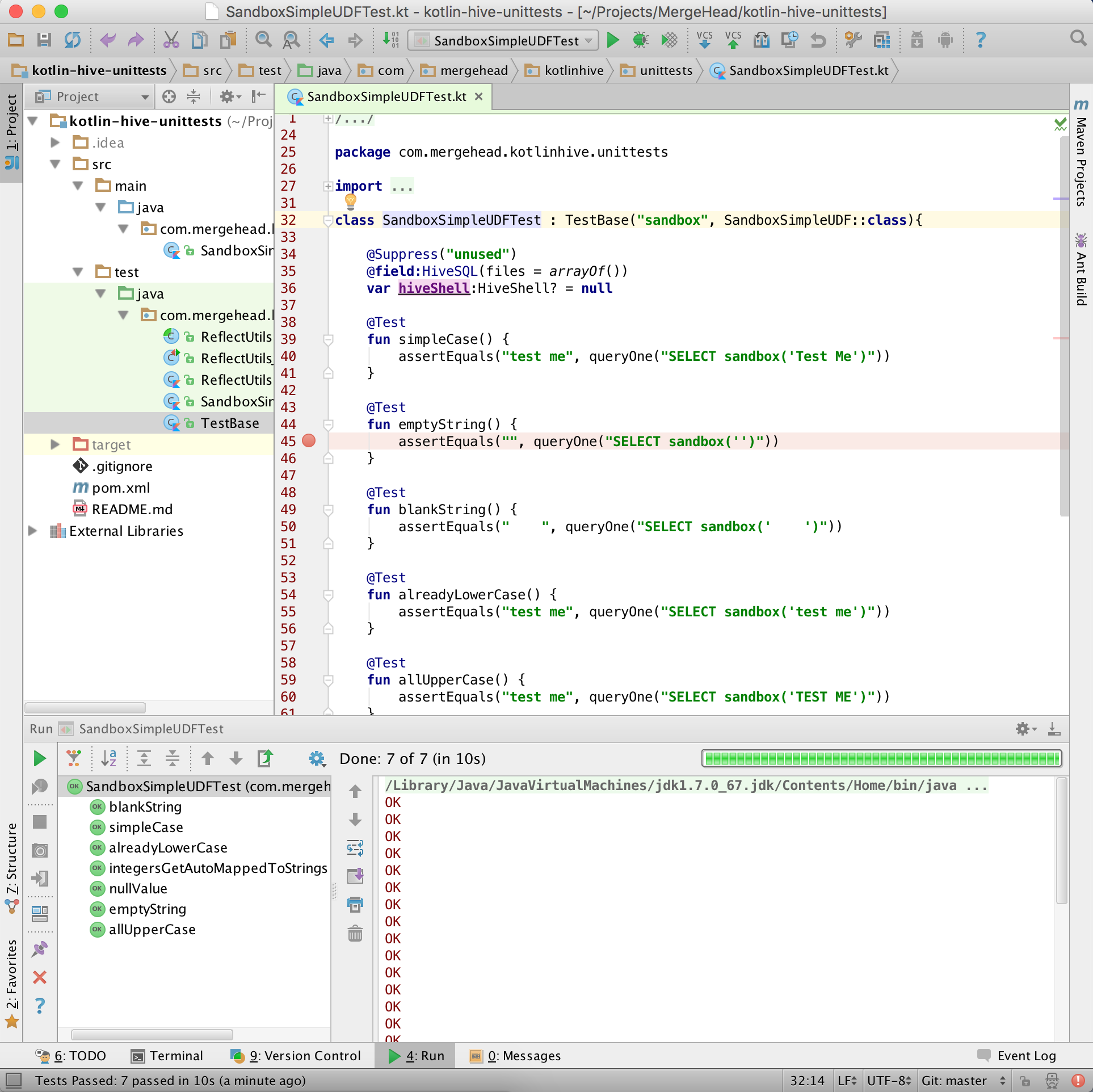
Given this, if you open the full source for this post (see here) as an IDEA project after installing the Kotlin plugin, then you should be able to run any test file or even individual test method by just right clicking and selecting “Run YourTest”.  You’ll then get presented with a nicer, more readable view of the results at the bottom of the IDE like so:

IDEA Kotlin Unit Tests Screenshot

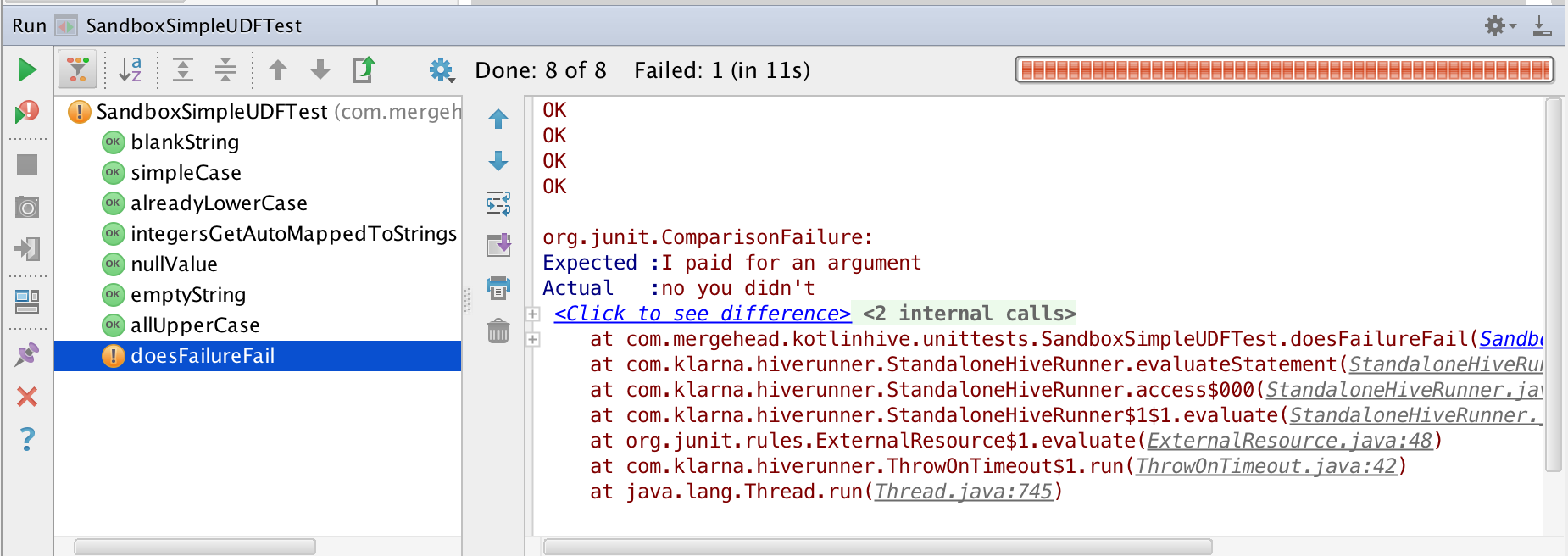
If a test fails, its icon will turn red or yellow depending on the nature of the failure.  Clicking on a particular test will show you the stdout / stderr streams from just that test execution.  Integrated full text  search (including regexp support) is available for all output.  It can get you into a nice workflow of change code, run tests with a hot key, and repeat if IDEs are your thing.  If not, then the command line option plus your favorite text editor can be your end all.

In keeping with the spirit of the last section, here’s what failure in IDEA would look like:

IDEA Kotlin Hive Unit Tests Failure

One last thing worth mentioning is that the IDE makes it pretty easy to set break points, run specific tests with a debugger, and then step through your code and even Hive / Hadoop original source step-by-step so you can know exactly what went wrong (e.g., Hive is expecting to get an object inspector for a what?! How did that happen??).

Final words

So there’s a basis for automated testing of all our new Hive UDFs. If you’d like to see the full project source used here, check out this repo.

See you in the next post!

Kotlin on Apache Hive – Unit Tests

Kotlin on Apache Hive – Intro

Why am I doing this?

For the most part, Hive has been a great way of keeping data engineering and analytics code as friendly and immediately usable as possible for less technical colleagues.  However, as your basic model grows, it will almost never be enough to use only simple HiveQL to both scale and get across the product finish line as quickly and often as possible.  As such, Kotlin has (so far!) been a pretty nice way to start extending functionality via Hive UDFs in a safe, easy, and fast way.  It’s also significantly easier to test with!

To organize my thoughts, I’m writing about a lot of the lessons I’ve learned and other random thoughts I’ve picked up while working Kotlin into a number of Hive projects.  Maybe someone else out there might even find this helpful too!

Setup

I’ve been working mostly with Hive on Amazon Elastic MapReduce on their 4.x releases.  This dictates the versions of Hive / Hadoop, but almost all of this should still apply if you’re running on different, newer versions internally.  Given that, these are the relevant specifications used for this demo:

  1. Apache Hive 1.0.0
    With some forward patches applied by Amazon when in EMR
  2. Apache Hadoop 2.6.0
    With some forward patches applied by Amazon when in EMR
  3. Kotlin 1.0.0
  4. Maven 3.2.1
  5. JDK 1.7.0_79
    Used for local builds / verification, but note Kotlin supports 1.6

What is a Hive UDF?

In Hive, a UDF (or User Defined Function) is an extension to the core HiveQL language that can be added at run-time via the JVM.  Hive adds many UDFs to itself depending on the exact version you’re running.  You may also add your own extensions by following a fairly simple process.

Note that you may often see people applying a transform map/reduce step that passes to scripts outside of Hive (e.g., python).  This is not a UDF!  For example, this might look something like this:

SELECT 
  TRANSFORM(user_id, a, bunch, of, cols, from, some_table)
  USING 'python my_cool_script.py'
  AS (user_id, separated, output, cols, from, my_cool_script)
FROM some_table;

This is potentially super nice if you know nothing about writing, building, and deploying to the JVM (which admittedly can be confusing)!  And, in some cases, if what you want to do can be fully contained in a single transform script pass, then this can be a great solution.  However, also note that:

  1. Hive worker must de-serialize all data from its input into memory to start the job
  2. Hive worker must re-serialize all data to stdin of the transform script
  3. Transform script must de-serialize stdin stream in order to do its work
  4. Transform script must re-serialize all data to stdout to hand back to Hive worker
  5. Hive worker must de-serialize all data from stdout to memory to continue the query

Hopefully it is obvious that this is a bananas amount of overhead.  This means if you’re piping everything through a python (or similar) script just so that you can transform one column with a familiar library that Hive doesn’t appear to support (I have seen this a lot!), then this is a *wildly* and unnecessarily bananas amount of overhead.

Additionally, note that:

  1. Your service provider (e.g., EMR, internal ops) must supply the exact versions and set of libraries you need for whatever is running your scripts.  If they won’t or can’t change these, then you’ll be getting severely limited in how you can solve your problem.  Hive / Hadoop provides no means of doing this provisioning for you.  However, you can do your own provisioning by supplying your own jars!
  2. Your transform script’s platform may de-serialize many types in an inconsistent fashion with Hive (this is *very* difficult to track down once it has become a problem).  Additionally, (de-)serializing any complex types (e.g., structs, arrays) can be a headache to get just right when doing these exchanges.
  3. If your transform script has a problem, you *must* go to the individual worker log to get any details and not the job log.  On top of that, you must very much hope that your transform script’s engine is providing good details to stderr and not stdout, which many tools unfortunately do not honor.  This can be a very, very frustrating process for any user not deeply familiar with how a Hive deployment works.

The simplest UDF

To start, lets build the simplest possible scalar UDF function so that we can create an end-to-end path for additional development.  In this case, I’m going to use the term ‘scalar’ to mean it operates in the context of a single and never across multiple rows in any way by either emitting or consuming multiple rows of data.  This does not mean that the input or output of the UDF can’t be something like an list or map of data.  It just means that that list or map would be a complex typed column of that singular row of data and not something that spans multiple rows in the table.  These would have to be exploded out prior to being fed into something like an aggregation function.

Our requirements will be to create a function ‘sandbox’ which takes an input string and returns the same string in all lowercase characters.  If it receives a NULL input, it will return a NULL response.  An example of using this function in a query would look like this:

SELECT sandbox('Test Me');
  ==> test me

An implementation of that might look something like this (bare with the Java syntax highlighting getting applied to Kotlin source for now please, WordPress doesn’t support Kotlin at the moment):

import org.apache.hadoop.hive.ql.exec.Description
import org.apache.hadoop.hive.ql.exec.UDF

@Description(
    name = "sandbox",
    value = "_FUNC_(x) - Takes in a string, returns downcased version of that string",
    extended = """
For example, you could do something like this:

  SELECT _FUNC_('Test Me');
    ==> test me
"""
)
class SandboxSimpleUDF : UDF() {

    fun evaluate(input:String?):String? {
        return input?.toLowerCase()
    }

}

Pretty easy right?  I won’t go over all the Kotlin specific details (try this great playpen out to get a feel for how Kotlin works), but I will go over those specifically relevant to Hive.

First off, the @Description annotation provides metadata for Hive to provide to the user via the describe command.

The actual work here will be performed by the evaluate method.  Note that this is *not* overridden.  Hive will conventionally look for all methods named ‘evaluate’ at run-time using reflection to figure out how to map query execution to this logic.  Note too that every worker will instantiate one (and exactly one!) new instance of the UDF object in order to call the appropriate evaluate method for that job, so in theory you could track some state from call to call, but don’t get too far ahead of yourself yet!

Note that evaluate must support NULL values coming in and going out because of our requirements, so the Kotlin I/O types must have the ? suffix added.  By additionally using ? when calling into the input object, we’re saying that it’s ok to just ignore the call if input is undefined.  It’s essentially a more succinct way of saying:

if(input == null) {
    return null
}
return input!!.toLowerCase()

We could go even further and put the one-liner function as:

fun evaluate(input:String?):String? = input?.toLowerCase()

Personally I prefer the bracketed syntax for readability, but it’s worthwhile knowing that this is a stylistic option.  It might be useful if you need to overload a bazillion versions of the method, for instance.

Nice chars, but what good is it to me?

Now we’re left with how to verify and deploy this.  To begin with, let’s set up a Maven project to do the build.  Here I will use Apache Maven (homebrew installation instructions here) purely out of familiarity and because I could find ample examples when I started for Kotlin (notably to support Kotlin/Java cross-compile support).  If you prefer not to, there should be enough out there now to use Gradle or any other platform.

The pom.xml file I’ve used for this simplest case looks like this:

<project xmlns="http://maven.apache.org/POM/4.0.0" xmlns:xsi="http://www.w3.org/2001/XMLSchema-instance"
         xsi:schemaLocation="http://maven.apache.org/POM/4.0.0 http://maven.apache.org/maven-v4_0_0.xsd">
    <modelVersion>4.0.0</modelVersion>
    <groupId>com.mergehead</groupId>
    <artifactId>kotlinhive-intro</artifactId>
    <version>1.0.0</version>
    <packaging>jar</packaging>

    <name>Kotlin on Apache Hive - Intro</name>
    <description>Example code for post</description>

    <properties>
        <project.build.sourceEncoding>UTF-8</project.build.sourceEncoding>
        <kotlin.version>1.0.0</kotlin.version>
        <hadoop.version>2.6.0</hadoop.version>
        <hive.version>1.0.0</hive.version>
    </properties>

    <dependencies>
        <dependency>
            <groupId>org.jetbrains.kotlin</groupId>
            <artifactId>kotlin-stdlib</artifactId>
            <version>${kotlin.version}</version>
        </dependency>

        <dependency>
            <groupId>org.apache.hadoop</groupId>
            <artifactId>hadoop-common</artifactId>
            <version>${hadoop.version}</version>
            <scope>provided</scope>
        </dependency>

        <dependency>
            <groupId>org.apache.hive</groupId>
            <artifactId>hive-exec</artifactId>
            <version>${hive.version}</version>
            <scope>provided</scope>
        </dependency>
    </dependencies>

    <build>
        <plugins>
            <plugin>
                <artifactId>kotlin-maven-plugin</artifactId>
                <groupId>org.jetbrains.kotlin</groupId>
                <version>${kotlin.version}</version>

                <configuration/>
                <executions>
                    <execution>
                        <id>compile</id>
                        <phase>process-sources</phase>
                        <goals>
                            <goal>compile</goal>
                        </goals>
                    </execution>
                    <execution>
                        <id>test-compile</id>
                        <phase>process-test-sources</phase>
                        <goals>
                            <goal>test-compile</goal>
                        </goals>
                    </execution>
                </executions>
            </plugin>

            <plugin>
                <groupId>org.apache.maven.plugins</groupId>
                <artifactId>maven-dependency-plugin</artifactId>
                <version>2.8</version>
                <executions>
                    <execution>
                        <id>copy-dependencies</id>
                        <phase>package</phase>
                        <goals>
                            <goal>copy-dependencies</goal>
                        </goals>
                        <configuration>
                            <outputDirectory>${project.build.directory}/jars</outputDirectory>
                            <includeArtifactIds>kotlin-stdlib,kotlin-runtime</includeArtifactIds>
                        </configuration>
                    </execution>
                </executions>
            </plugin>
        </plugins>
    </build>

</project>

This should:

  1. Successfully build the new UDF for the Hive/Hadoop versions we discussed
  2. Generate a jar file at target/kotlinhive-intro-1.0.0.jar that can be loaded into a Hive shell
  3. Add two jar files in target/jars/ which are the kotlin dependencies to be loaded into the Hive shell at run-time

This should all build with a command on your terminal from the project root directory (where your pom.xml file is) like so:

mvn clean package

I know this looks like a lot of configuration to get started, but it makes a great deal much easier down the line when starting to smash together lots of other code, libraries, configuration, and external systems.  If you still can’t stand it, consider going the Gradle route instead!

Verify that we didn’t screw up

We can do a super fast verification of all this by launching a local mode Hive shell on your machine (great instructions for installing on osx, other platforms are but a google away).  Using the verification script found here, this is what executing the new UDF would look like (with a little white space added output for readability):

hive> ADD JAR jars/kotlin-runtime-1.0.0.jar;
Added [jars/kotlin-runtime-1.0.0.jar] to class path
Added resources: [jars/kotlin-runtime-1.0.0.jar]

hive> ADD JAR jars/kotlin-stdlib-1.0.0.jar;
Added [jars/kotlin-stdlib-1.0.0.jar] to class path
Added resources: [jars/kotlin-stdlib-1.0.0.jar]

hive> ADD JAR kotlinhive-intro-1.0.0.jar;
Added [kotlinhive-intro-1.0.0.jar] to class path
Added resources: [kotlinhive-intro-1.0.0.jar]

hive> CREATE TEMPORARY FUNCTION sandbox AS 'com.mergehead.kotlinhive.intro.SandboxSimpleUDF';
OK
Time taken: 0.342 seconds

hive> SELECT sandbox('Test Me');
OK
test me
Time taken: 0.333 seconds, Fetched: 1 row(s)

hive> DESCRIBE FUNCTION sandbox;
OK
sandbox(x) - Takes in a string, returns downcased version of that string
Time taken: 0.046 seconds, Fetched: 1 row(s)

hive> DESCRIBE FUNCTION EXTENDED sandbox;
OK
sandbox(x) - Takes in a string, returns downcased version of that string

For example, you could do something like this:

  SELECT sandbox('Test Me');
    ==> test me

Time taken: 0.027 seconds, Fetched: 7 row(s)

Woo!  Success!  Or at least I got a success.  Hopefully you did too. Note that I have found that the Kotlin jar file add order sometimes causes problems (though I couldn’t reproduce here).  This especially seemed to occur on older pre-release versions of Kotlin.  If you’re ever getting some really bizarre results when adding or calling the function, try reversing the order of the ADD JAR calls for the Kotlin dependencies.

You might want to play around with your new toy for a bit to see how it behaves.  Try passing in a NULL to make sure that works.  What happens if we pass an integer?  Is this ok for what you want?

What next?

I’m going to cut this off here for now as a completed product. You can find a full project implementation for all of this here: https://github.com/mergehead/kotlin-hive-intro

I’ll plan to follow up with at least the following topics for future articles:

  1. How to unit test Kotlin Hive UDFs in a sane fashion?
    Our verification step would not be fun for lots of changing UDFs­
  2. Can we make more complicated scalar UDFs in Kotlin?
    Examples:  named structs in/out, scalar lists in/out, type overloading
  3. What would a UDTF look like in Kotlin?
    Make your own complex, custom explodes
  4. What would a UDAF look like in Kotlin?
    Aggregate all the things however you wish
  5. How do you create an operational model for Kotlin on Hive?
    Users shouldn’t have to know about adding jars and functions for ephemeral clusters if they can avoid it!  Persistent clusters should be able to both clearly represent their current versioning and be easily re-buildable should they fail.
  6. How do you do integration testing on Hive? (maybe!)
    What if we use more than just Hive?  Or want to verify full, abbreviated data flowing through a large set of scripts without allocating a bazillion expensive EC2 instances?


Kotlin on Apache Hive – Intro